The usual thing with a CMS is to use it to write content. Payload allows more: since the admin is a React application inside your project, you can add your own screens, collections and routes, and make them look as if they had always been there.
To show it, we walk you through what we built on this site: the Social studio. You pick a social network and a blog article, chat with an AI assistant, choose the images and download the result, or publish it if the account is connected. All without leaving the admin.
What it looks like
This is the entry screen. At the top, the status of the networks; below, the form to start a post. Here we have already picked, as the reference, the article How codegea.com is built:
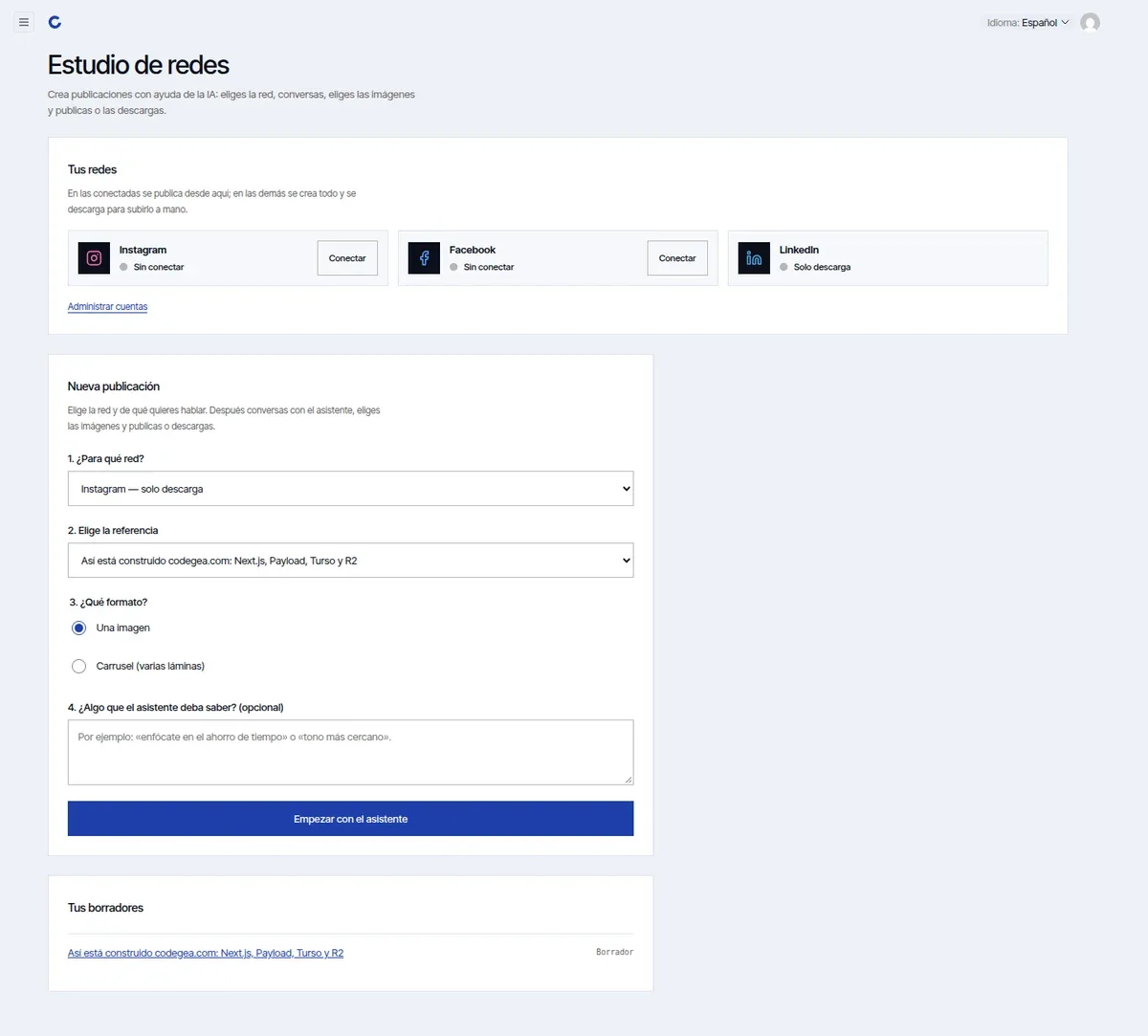
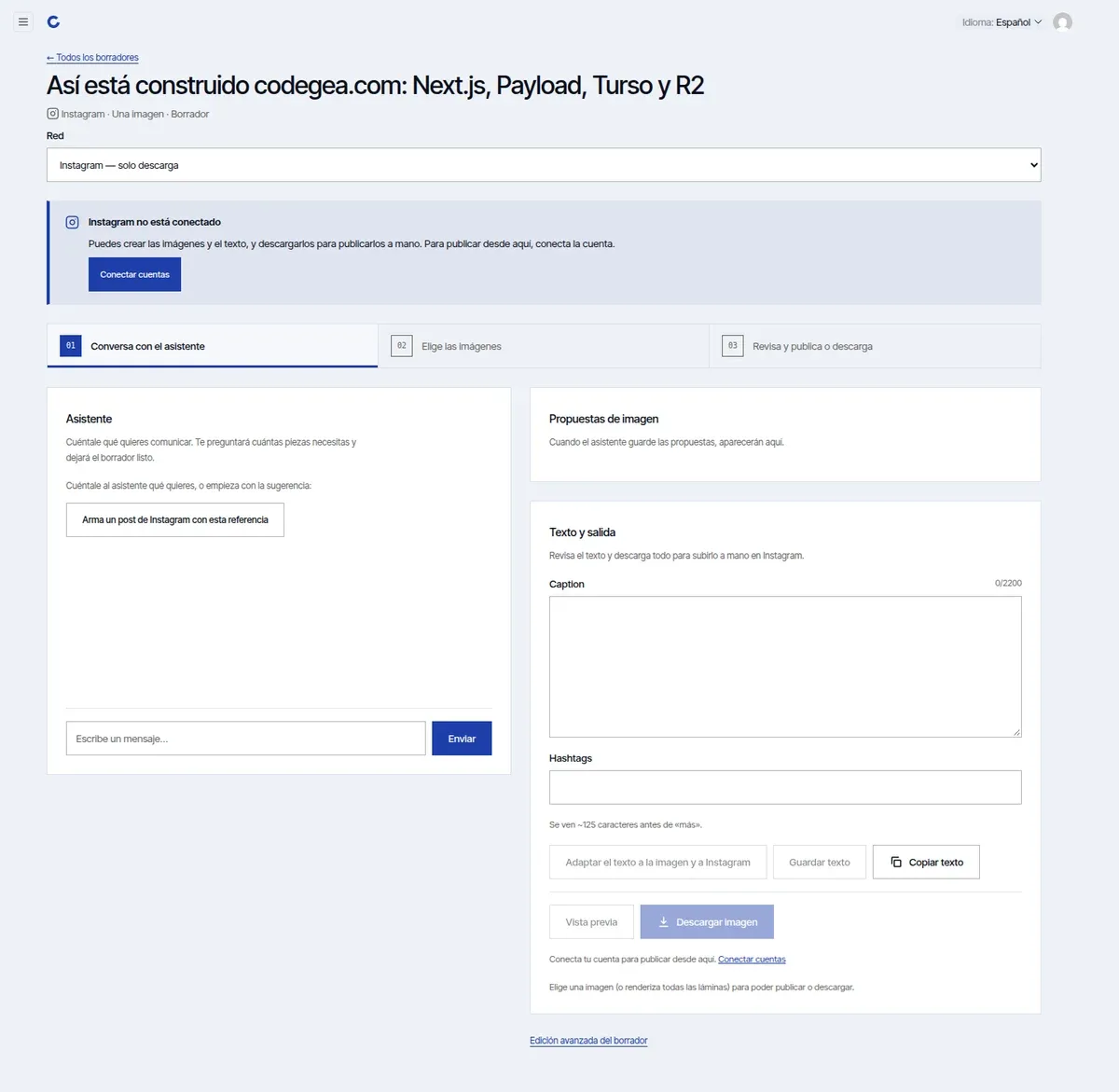
Pressing "Start with the assistant" creates a draft and opens its work screen, with three steps: chat, choose images, review and publish or download.
The images that come out are 1080×1350 slides with the brand. These three use the same headline, one with each template: editorial, split and cobalt.
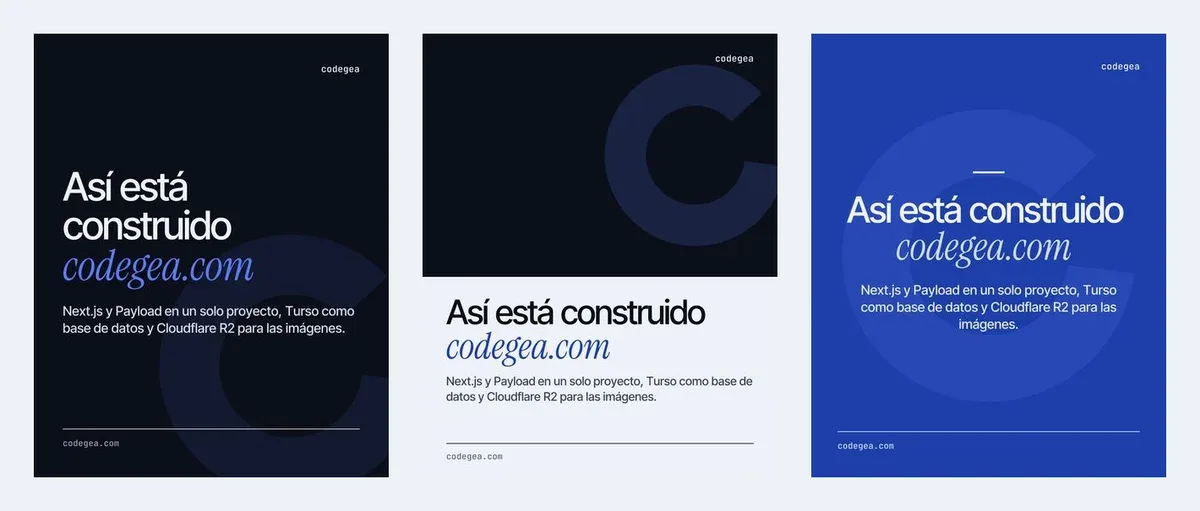
A note about these screenshots: the studio is freshly opened, with no social accounts connected and without having called the assistant. We prefer not to show keys or spend AI credits for a photo. The slides are what the code generates with the real templates, from the article's text.
The pieces
For all this to live inside Payload you need six things. None is complicated; the charm is how they fit together.
1. A collection for the drafts
A draft is a document: it has a title, network, format (one image or a carousel), proposals, slides and status. So it is just another collection:
export const Socials: CollectionConfig = {
  slug: 'socials',
  labels: {
    singular: { es: 'Publicación social', en: 'Social post' },
    plural: { es: 'Publicaciones sociales', en: 'Social posts' },
  },
  admin: {
    useAsTitle: 'title',
    group: 'Redes',
    defaultColumns: ['title', 'format', 'status', 'publishedAt'],
  },
  access: {
    read: authenticated,
    create: authenticated,
    update: authenticated,
    delete: authenticated,
  },
  fields: [/* title, network, reference, proposals, slides… */],
};
With that you already get the list, the "advanced" editing and the permissions for free. Only a logged-in user sees the drafts.
One field doesn't store data: a type: 'ui' with a custom component that draws an "Open the assistant" link inside the normal edit form. It is the way to mix Payload's form with your own interface.
2. A custom view in the admin
The assistant is a whole screen, not a form. Payload lets you register your own views at a path:
admin: {
  components: {
    views: {
      social: { Component: '/components/admin/social/studio#SocialStudio', path: '/social', exact: true },
      accounts: { Component: '/components/admin/social/accounts#AccountsView', path: '/social/accounts' },
    },
  },
},
That gives two new addresses, /admin/social and /admin/social/accounts. And so they can be found, they are added to the side menu with afterNavLinks:
afterNavLinks: ['/components/admin/social/nav-link#StudioNavLink'],That way "Social studio" and "Social accounts" appear at the end of the menu, below Payload's groups:
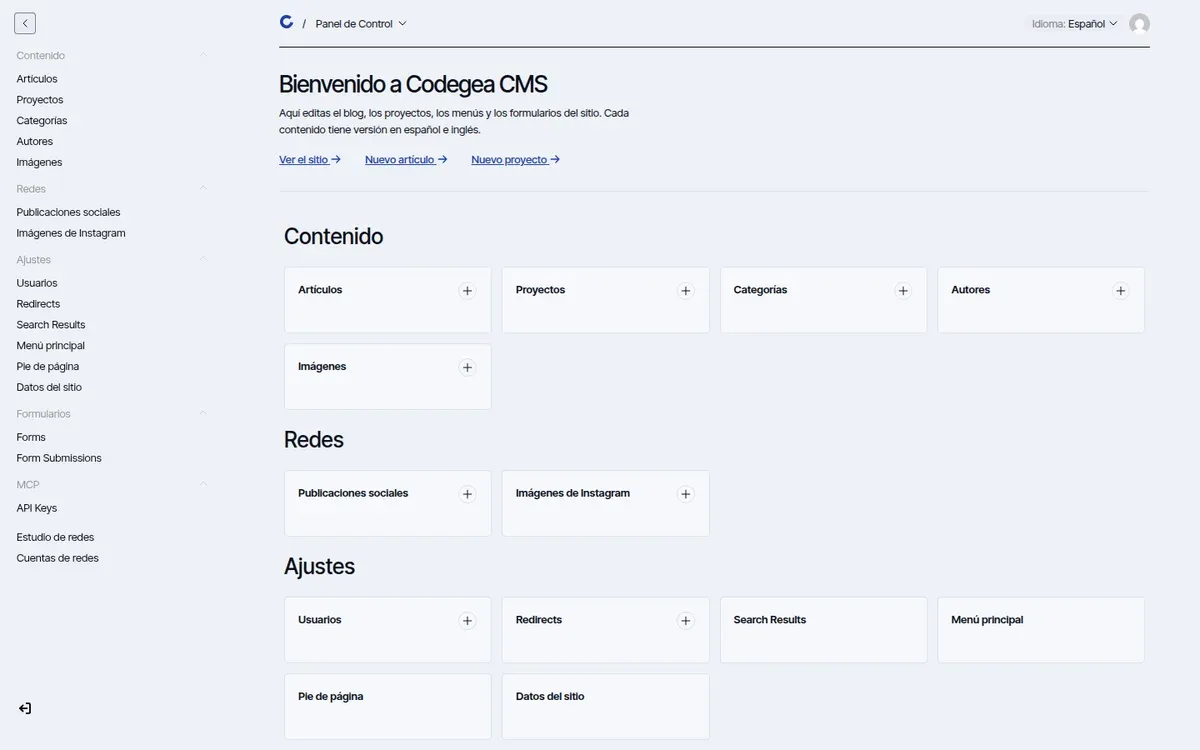
The views use the admin template (DefaultTemplate), so they inherit the header, menu and styles. There is nothing to redo.
3. API routes, always with a session
The browser needs to ask the server for things: create a draft, generate images, publish. Each one is a route under /api/social/…, and they all start the same way: they check that the caller is an admin user.
/** Admin user making the request (by their session cookie), or `null`. */
export async function adminUser(req: NextRequest) {
  const payload = await payloadClient();
  const { user } = await payload.auth({ headers: req.headers });
  return user;
}
export async function POST(req: NextRequest) {
if (!(await adminUser(req))) return new Response('Unauthorized', { status: 401 });
// …
}The ones that generate text or images carry export const maxDuration = 60, which is the cap our current hosting plan gives us. If your routes take longer, you will need another plan or to split the work.
4. The assistant
The conversation uses Vercel's AI SDK (ai) with an OpenAI model. The model is set with environment variables, it isn't fixed in the code. The API key goes in .env, never in the repository.
What makes the assistant useful is not the model but the context we give it. Each network has a sheet with its limits and tone:
instagram: {
  label: 'Instagram',
  captionMax: 2200,
  foldAt: 125,
  direct: true,
  tone: `- Close and visual tone, short sentences…
- The first ~125 characters are all that shows before "more": the hook goes there.
- Links aren't clickable in the caption…`,
},
captionMax is the character maximum, foldAt is where the text is cut with "see more", and tone are the style instructions. LinkedIn has direct: false: there the draft is only downloaded. Changing a network's behavior means changing that sheet.
5. The images
The slides are drawn with code, with the same technique we use for the share images of our articles: a React component, next/og and sharp. All networks use 1080×1350 (4:5), so switching network doesn't force you to regenerate anything.
There are four templates: editorial, split, cobalt and image only. The first three work without any background, just ink and the isotype; the fourth uses an AI-generated background. In carousels, the AI art is generated only for the first and last slide.
6. The accounts
To really publish, the studio needs to connect to Instagram and Facebook. The credentials live in a Payload global, and it is what needs the most care:
const secret = {
  access: { read: () => false, create: () => false, update: () => false },
  admin: { hidden: true },
} as const;

{ name: 'accessToken', type: 'text', ...secret },
The token is stored in the database, but no user, not even an administrator, can read it through the API or see it in the admin. Only the server uses it when publishing.
The accounts screen explains, step by step, how to connect each network:
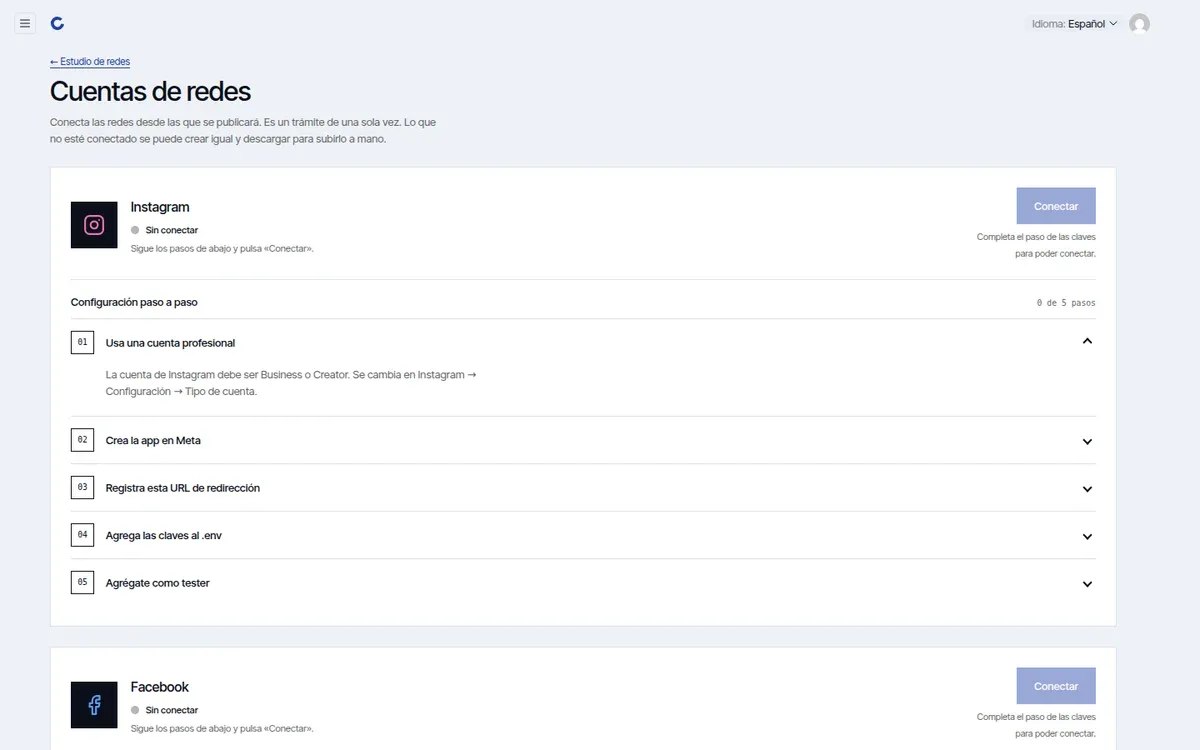
For Instagram there are five: a professional account, creating the app in Meta, registering the redirect URL, adding the keys to .env and adding yourself as a tester. It is a one-time process, but it is worth having in front of you and not in someone's memory.
What it doesn't do, and what it cost
- It is not a content scheduling tool. It publishes when you ask it to. It has no calendar or queue.
- Publishing to Instagram and Facebook depends on a Meta app. While it is in development mode, only test users can publish. Check Meta's requirements before promising it to a client.
- LinkedIn is download only. The studio leaves the text and images ready, and you upload them by hand.
- The assistant has a cost. Every conversation and every generated image spends AI credits. That is why the slides work without a background image, and AI art is optional.
- The routes have a 60-second cap because of the hosting plan.
Is something like this useful to you?
A studio like this makes sense if you publish regularly from the same content (articles, projects) and want every piece to come out with the brand without going through a design editor. If you publish twice a month, a paid post scheduler is more sensible.
The important thing is the idea: Payload's admin is not a closed box. A collection, a view, a few routes and a couple of components are enough to turn it into the tool your team needs. If you want to start with the basics, first look at how to customize the admin with your brand, and if you prefer an outside assistant to edit the content, we have an MCP server on your CMS.
Written by
Derian Pinto
Founder & Full Stack Developer
Founder of Codegea. Builds custom websites, stores and platforms, and integrates and supports Arc XP for media companies.